
logrotate的使用
本文最后更新于 2025-07-14,文章内容可能已经过时。
logrotate 简介
logrotate 是一个 linux 系统日志的管理工具。可以对单个日志文件或者某个目录下的文件按时间 / 大小进行切割,压缩操作;指定日志保存数量;还可以在切割之后运行自定义命令。
logrotate 是基于crontab运行的,所以这个时间点是由crontab控制的,具体可以查询crontab的配置文件 /etc/anacrontab。 系统会按照计划的频率运行 logrotate,通常是每天。在大多数的 Linux 发行版本上,计划每天运行的脚本位于 /etc/cron.daily/logrotate。
主流 Linux 发行版上都默认安装有 logrotate 包,如果你的 linux 系统中找不到 logrotate, 可以使用 apt-get或 yum命令来安装。
安装命令
yum -y install logrotate
logrotate 运行机制
logrotate 在很多 Linux 发行版上都是默认安装的。系统会定时运行 logrotate,一般是每天一次。系统是这么实现按天执行的。crontab 会每天定时执行 /etc/cron.daily 目录下的脚本,而这个目录下有个文件叫 logrotate。在 centos 上脚本内容是这样的:
[root@VM-4-10-centos ~]# cat /etc/cron.daily/logrotate
#!/bin/sh

/usr/sbin/logrotate -s /var/lib/logrotate/logrotate.status /etc/logrotate.conf
EXITVALUE=$?
if [ $EXITVALUE != 0 ]; then
    /usr/bin/logger -t logrotate "ALERT exited abnormally with [$EXITVALUE]"
fi
exit 0
[root@VM-4-10-centos ~]#
系统自带 cron task:/etc/cron.daily/logrotate,每天运行一次。
注意事项
- 配置文件里一定要配置
rotate 文件数目这个参数。如果不配置默认是 0 个,也就是只允许存在一份日志,刚切分出来的日志会马上被删除。 - 执行 logrotate 命令最好加
-f参数,不然有时候配置文件修改的内容不生效。
很多程序的会用到 logrotate 滚动日志,比如 nginx。它们安装后,会在 /etc/logrotate.d 这个目录下增加自己的 logrotate 的配置文件。logrotate 什么时候执行 /etc/logrotate.d 下的配置呢?看到 /etc/logrotate.conf 里这行,一切就不言而喻了。
include /etc/logrotate.d
logrotate 原理
logrotate 是怎么做到滚动日志时不影响程序正常的日志输出呢?logrotate 提供了两种解决方案:① create; ② copytruncate;
Linux 文件操作机制
先介绍一下相关的 Linux 下的文件操作机制。
Linux 文件系统里文件和文件名的关系如下图。
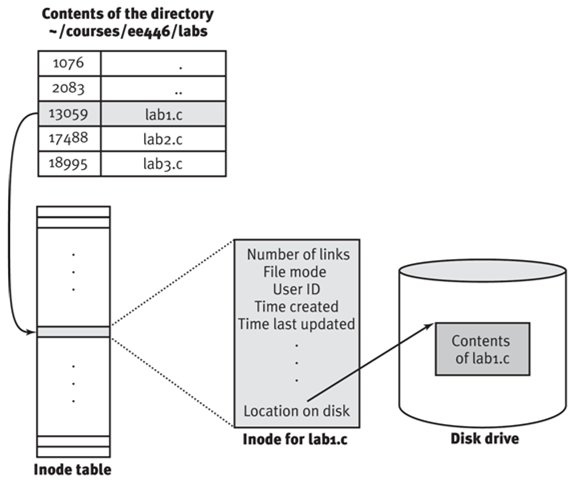
目录也是文件,文件里存着文件名和对应的 inode 编号。通过这个 inode 编号可以查到文件的元数据和文件内容。文件的元数据有引用计数、操作权限、拥有者 ID、创建时间、最后修改时间等等。文件件名并不在元数据里而是在目录文件中。因此文件改名、移动,都不会修改文件,而是修改目录文件。
借《UNIX 环境高级编程》里的图说一下进程打开文件的机制。
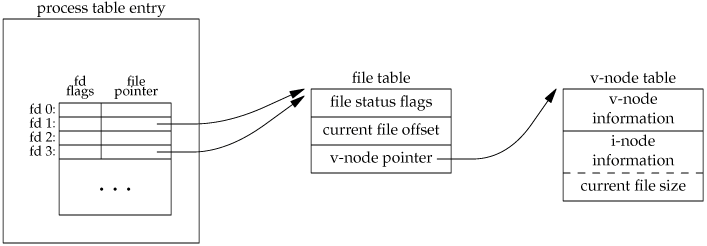
进程每新打开一个文件,系统会分配一个新的文件描述符给这个文件。文件描述符对应着一个文件表。表里面存着文件的状态信息(O_APPEND/O_CREAT/O_DIRECT…)、当前文件位置和文件的 inode 信息。系统会为每个进程创建独立的文件描述符和文件表,不同进程是不会共用同一个文件表。正因为如此,不同进程可以同时用不同的状态操作同一个文件的不同位置。文件表中存的是 inode 信息而不是文件路径,所以==文件路径发生改变不会影响文件操作==。
create
这也就是默认的方案,可以通过 create 命令配置文件的权限和属组设置;这个方案的思路是重命名原日志文件,创建新的日志文件。详细步骤如下:
- 重命名正在输出日志文件,因为重命名只修改目录以及文件的名称,而进程操作文件使用的是 inode,所以并不影响原程序继续输出日志。
- 创建新的日志文件,文件名和原日志文件一样,注意,此时只是文件名称一样,而 inode 编号不同,原程序输出的日志还是往原日志文件输出。
- 最后通过某些方式通知程序,重新打开日志文件;由于重新打开日志文件会用到文件路径而非 inode 编号,所以打开的是新的日志文件。
如上也就是 logrotate 的默认操作方式,也就是 mv+create 执行完之后,通知应用重新在新文件写入即可。mv+create 成本都比较低,几乎是原子操作,如果应用支持重新打开日志文件,如 syslog, nginx, mysql 等,那么这是最好的方式。
不过,有些程序并不支持这种方式,压根没有提供重新打开日志的接口;而如果重启应用程序,必然会降低可用性,为此引入了copytruncate方式。
copytruncate
该方案是把正在输出的日志拷 (copy) 一份出来,再清空 (trucate) 原来的日志;详细步骤如下:
- 将当前正在输出的日志文件复制为目标文件,此时程序仍然将日志输出到原来文件中,此时,原文件名也没有变。
- 清空日志文件,原程序仍然还是输出到预案日志文件中,因为清空文件只把文件的内容删除了,而 inode 并没改变,后续日志的输出仍然写入该文件中。
如上所述,对于 copytruncate 也就是先复制一份文件,然后清空原有文件。
通常来说,清空操作比较快,但是如果日志文件太大,那么复制就会比较耗时,从而可能导致部分日志丢失。不过这种方式不需要应用程序的支持即可。
配置 logrotate
- 执行文件:
/usr/sbin/logrotate - 主配置文件:
/etc/logrotate.conf - 自定义配置文件:
/etc/logrotate.d/*.conf
修改配置文件后,并==不需要重启服务==。 由于 logrotate 实际上只是一个可执行文件,不是以 daemon 运行。
/etc/logrotate.conf - 顶层主配置文件,通过 include 指令,会引入 /etc/logrotate.d 下的配置文件
[root@gop-sg-192-168-56-103 wangao]# cat /etc/logrotate.conf
# see "man logrotate" for details
# rotate log files weekly
weekly

# keep 4 weeks worth of backlogs
rotate 4

# create new (empty) log files after rotating old ones
create

# use date as a suffix of the rotated file
dateext

# uncomment this if you want your log files compressed
#compress

# RPM packages drop log rotation information into this directory
include /etc/logrotate.d

# no packages own wtmp and btmp -- we'll rotate them here
/var/log/wtmp {
    monthly
    create 0664 root utmp
    minsize 1M
    rotate 1
}

/var/log/btmp {
    missingok
    monthly
    create 0600 root utmp
    rotate 1
}

# system-specific logs may be also be configured here.
/etc/logrotate.d/ 通常一些第三方软件包,会把自己私有的配置文件,也放到这个目录下。 如 yum,zabbix-agent,syslog,nginx 等。
[root@VM-4-10-centos logrotate.d]# cat yum
/var/log/yum.log {
    missingok
    notifempty
    maxsize 30k
    yearly
    create 0600 root root
}
[root@VM-4-10-centos logrotate.d]#
运行 logrotate
具体 logrotate 命令格式如下:
logrotate [OPTION...] <configfile>
-d, --debug :debug 模式,测试配置文件是否有错误。
-f, --force :强制转储文件。
-m, --mail=command :压缩日志后,发送日志到指定邮箱。
-s, --state=statefile :使用指定的状态文件。
-v, --verbose :显示转储过程。
crontab 定时:通常惯用的做法是配合 crontab 来定时调用。
crontab -e
*/30 * * * * /usr/sbin/logrotate /etc/logrotate.d/rsyslog > /dev/null 2>&1 &
手动运行:debug 模式:指定
[-d|--debug]
logrotate -d <configfile>
并不会真正进行 rotate 或者 compress 操作,但是会打印出整个执行的流程,和调用的脚本等详细信息。
verbose 模式: 指定
[-v|--verbose]
logrotate -v <configfile>
会真正执行操作,打印出详细信息(debug 模式,默认是开启 verbose)
logrotate 参数
详细介绍请自行 man logrotate, 或者在线 man page。
主要介绍下完成常用需求会用到的一些参数。
一个典型的配置文件如下:
[root@localhost ~]# vim /etc/logrotate.d/log_file

/var/log/log_file {

    monthly
    rotate 5
    compress
    delaycompress
    missingok
    notifempty
    create 644 root root
    postrotate
        /usr/bin/killall -HUP rsyslogd
    endscript
}
monthly: 日志文件将按月轮循。其它可用值为daily,weekly或者yearly。rotate 5: 一次将存储 5 个归档日志。对于第六个归档,时间最久的归档将被删除。compress: 在轮循任务完成后,已轮循的归档将使用 gzip 进行压缩。delaycompress: 总是与 compress 选项一起用,delaycompress 选项指示 logrotate 不要将最近的归档压缩,压缩将在下一次轮循周期进行。这在你或任何软件仍然需要读取最新归档时很有用。missingok: 在日志轮循期间,任何错误将被忽略,例如 “文件无法找到” 之类的错误。notifempty: 如果日志文件为空,轮循不会进行。create 644 root root: 以指定的权限创建全新的日志文件,同时 logrotate 也会重命名原始日志文件。postrotate/endscript: 在所有其它指令完成后,postrotate 和 endscript 里面指定的命令将被执行。在这种情况下,rsyslogd 进程将立即再次读取其配置并继续运行。
上面的模板是通用的,而配置参数则根据你的需求进行调整,不是所有的参数都是必要的。
/var/log/log_file {
    size=50M
    rotate 5
    dateext
    create 644 root root
    postrotate
        /usr/bin/killall -HUP rsyslogd
    endscript
}
在上面的配置文件中,我们只想要轮询一个日志文件,size=50M 指定日志文件大小可以增长到 50MB,dateext 指 示让旧日志文件以创建日期命名。
常见配置参数
- daily :指定转储周期为每天
- weekly :指定转储周期为每周
- monthly :指定转储周期为每月
- rotate count :指定日志文件删除之前转储的次数,0 指没有备份,5 指保留 5 个备份
- tabooext [+] list:让 logrotate 不转储指定扩展名的文件,缺省的扩展名是:.rpm-orig, .rpmsave, v, 和 ~
- missingok:在日志轮循期间,任何错误将被忽略,例如 “文件无法找到” 之类的错误。
- size size:当日志文件到达指定的大小时才转储,bytes (缺省) 及 KB (sizek) 或 MB (sizem)
- compress: 通过 gzip 压缩转储以后的日志
- nocompress: 不压缩
- copytruncate:用于还在打开中的日志文件,把当前日志备份并截断
- nocopytruncate: 备份日志文件但是不截断
- create mode owner group : 转储文件,使用指定的文件模式创建新的日志文件
- nocreate: 不建立新的日志文件
- delaycompress: 和 compress 一起使用时,转储的日志文件到下一次转储时才压缩
- nodelaycompress: 覆盖 delaycompress 选项,转储同时压缩。
- errors address : 专储时的错误信息发送到指定的 Email 地址
- ifempty :即使是空文件也转储,这个是 logrotate 的缺省选项。
- notifempty :如果是空文件的话,不转储
- mail address : 把转储的日志文件发送到指定的 E-mail 地址
- nomail : 转储时不发送日志文件
- olddir directory:储后的日志文件放入指定的目录,必须和当前日志文件在同一个文件系统
- noolddir: 转储后的日志文件和当前日志文件放在同一个目录下
- prerotate/endscript: 在转储以前需要执行的命令可以放入这个对,这两个关键字必须单独成行
手动运行 logrotate 演练
logrotate 可以在任何时候从命令行手动调用。 调用 /etc/lograte.d/ 下配置的所有日志:
[root@localhost ~]# logrotate /etc/logrotate.conf
要为某个特定的配置调用 logrotate:
[root@localhost ~]# logrotate /etc/logrotate.d/log_file
排障过程中的最佳选择是使用 -d 选项以预演方式运行 logrotate。要进行验证,不用实际轮循任何日志文件, 可以模拟演练日志轮循并显示其输出。
[root@localhost ~]# logrotate -d /etc/logrotate.d/log_file

reading config file /etc/logrotate.d/log_file
reading config info for /var/log/log_file

Handling 1 logs

rotating pattern: /var/log/log_file  monthly (5 rotations)
empty log files are not rotated, old logs are removed
considering log /var/log/log_file
  log does not need rotating
not running postrotate script, since no logs were rotated
正如我们从上面的输出结果可以看到的,logrotate 判断该轮循是不必要的。如果文件的时间小于一天,这就会发生了。
强制轮循即使轮循条件没有满足,我们也可以通过使用 -f 选项来强制 logrotate 轮循日志文件,-v 参数提供了详细的输出。
[root@localhost ~]# logrotate -vf /etc/logrotate.d/log_file

reading config file /etc/logrotate.d/log_file
reading config info for /var/log/log_file

Handling 1 logs

rotating pattern: /var/log/log_file  forced from command line (5 rotations)
empty log files are not rotated, old logs are removed
considering log /var/log/log_file
  log needs rotating
rotating log /var/log/log_file, log->rotateCount is 5
dateext suffix '-20180503'
glob pattern '-[0-9][0-9][0-9][0-9][0-9][0-9][0-9][0-9]'
previous log /var/log/log_file.1 does not exist
renaming /var/log/log_file.5.gz to /var/log/log_file.6.gz (rotatecount 5, logstart 1, i 5),
old log /var/log/log_file.5.gz does not exist
renaming /var/log/log_file.4.gz to /var/log/log_file.5.gz (rotatecount 5, logstart 1, i 4),
old log /var/log/log_file.4.gz does not exist
renaming /var/log/log_file.3.gz to /var/log/log_file.4.gz (rotatecount 5, logstart 1, i 3),
old log /var/log/log_file.3.gz does not exist
renaming /var/log/log_file.2.gz to /var/log/log_file.3.gz (rotatecount 5, logstart 1, i 2),
old log /var/log/log_file.2.gz does not exist
renaming /var/log/log_file.1.gz to /var/log/log_file.2.gz (rotatecount 5, logstart 1, i 1),
old log /var/log/log_file.1.gz does not exist
renaming /var/log/log_file.0.gz to /var/log/log_file.1.gz (rotatecount 5, logstart 1, i 0),
old log /var/log/log_file.0.gz does not exist
log /var/log/log_file.6.gz doesn't exist -- won't try to dispose of it
fscreate context set to unconfined_u:object_r:var_log_t:s0
renaming /var/log/log_file to /var/log/log_file.1
creating new /var/log/log_file mode = 0644 uid = 0 gid = 0
running postrotate script
set default create context
logrotate 日志切割轮询
由于 logrotate 是基于 cron 运行的,所以这个日志轮转的时间是由 cron 控制的,具体可以查询 cron 的配置文件 /etc/anacrontab,过往的老版本的文件为(/etc/crontab)
查看轮转文件:/etc/anacrontab
[root@gop-sg-192-168-56-103 logrotate.d]# cat /etc/anacrontab
# /etc/anacrontab: configuration file for anacron

# See anacron(8) and anacrontab(5) for details.

SHELL=/bin/sh
PATH=/sbin:/bin:/usr/sbin:/usr/bin
MAILTO=root
# the maximal random delay added to the base delay of the jobs
RANDOM_DELAY=45
# the jobs will be started during the following hours only
START_HOURS_RANGE=3-22

#period in days   delay in minutes   job-identifier   command
1   5   cron.daily      nice run-parts /etc/cron.daily
7   25  cron.weekly     nice run-parts /etc/cron.weekly
@monthly 45 cron.monthly        nice run-parts /etc/cron.monthly
使用 anacrontab 轮转的配置文件,日志切割的生效时间是在凌晨 3 点到 22 点之间,而且随机延迟时间是 45 分钟,但是这样配置无法满足我们在现实中的应用
现在的需求是将切割时间调整到ll每天的晚上 12 点,即每天切割的日志是前一天的 0-24 点之间的内容,操作如下:
mv /etc/anacrontab /etc/anacrontab.bak //取消日志自动轮转的设置
使用 crontab 来作为日志轮转的触发容器来修改 logrotate 默认执行时间
[root@gop-sg-192-168-56-103 logrotate.d]# vim /etc/crontab
SHELL=/bin/bash
PATH=/sbin:/bin:/usr/sbin:/usr/bin
MAILTO=root
HOME=/

# run-parts
01 * * * * root run-parts /etc/cron.hourly
59 23 * * * root run-parts /etc/cron.daily
22 4 * * 0 root run-parts /etc/cron.weekly
42 4 1 * * root run-parts /etc/cron.monthly
执行流程